Projects, Environments & GitHub
A Project is where Elowen reads files and runs project work. It also sets who can access those files and which environment commands use. You do not need to pick a Project for every message: a new conversation without an explicit target uses the first usable Project in your account's order.
Access a Project
- Open Projects and select the Project card.
- Check its kind: a Host computer folder, a Managed environment, or a paired Computer.
- Open People to review membership. If a Project is missing, ask its administrator or computer owner.
Administrators have access to host and managed Projects. Members need membership. A Computer is different: even an administrator must be explicitly added before running work on someone else's paired computer. Only that computer's pairing owner manages its members.
Administrators can manage membership from the account directory on host and managed Projects. On a managed Project, an ordinary account with sharing permission can invite someone by entering their Account ID and choosing Invite member. The directory of accounts is shown only to administrators. A paired-Computer owner with sharing permission can also invite by account ID. Members of a managed Project share its files and credentials stored in the environment, but not private conversations or personal integrations. A Computer member can read and change the operating-system user's files and run commands as that user. Share only when that access is intended.
Delete a Project
Check every path and resource in the deletion confirmation before proceeding. Also delete files is unchecked by default: the Project and its associated resources are removed, but its working-directory files remain. A managed Project's disk is part of the Project and is always removed, regardless of this checkbox. Select the checkbox only if you also want to remove the listed working directory and its contents, including a directory that existed before registration or adoption. Back up anything you want to keep first. The confirmed choice is retained after a restart or retry and cannot be changed on an operation already in progress. Protected locations (home, filesystem root, Elowen instance and client installation directories, and their parents) and directories overlapping another live Project are listed separately as preserved. The Project and its bound resources are still deleted, but files in those directories remain. The shared computer directory ~/.elowen is also protected. If a symbolic link changes the confirmed target, deletion stops for inspection instead of following it. Elowen stops Project activity and cleans up its resources before removing the Project; ordinary conversation history and usage accounting remain.
For a paired computer, selecting Also delete files removes only the Project's confirmed working directory on that computer. Plans and saved tool and workflow results in the shared ~/.elowen directory remain, including older leftovers. You can delete those contents manually when you no longer need them, but check first: another Project or Elowen instance using the same computer account may still need them.
If selected file cleanup needs an offline computer, or a cleanup provider is unavailable, the Project remains inactive with deletion blocked. Reconnect the computer or restore the provider, then retry deletion and confirm the displayed scope again. Restarting Elowen does not discard this obligation. A human non-administrator must retain another usable Project.
Arrange your Projects and choose the default
- On Projects, drag a card to reorder it. With a keyboard, focus its move handle, press Space or Enter, use the arrow keys, then press Space or Enter to drop it; Escape cancels.
- Move the Project you use most to the first position. It receives the Default badge.
The order belongs to your account and follows you across devices; newly granted Projects are added at the end. When a new conversation has no chosen target, Elowen uses the first usable Project in this order. An existing administrator conversation running on the host remains there.
Switch the Project used by chat
- For a new conversation, choose a different Project in the picker if you do not want your default.
- In an existing conversation, finish or stop current work, then open the Project picker in the chat header and choose a destination.
- Wait for the displayed Project to change. If an environment-start operation appears, check its final status before relying on that environment.
- Check the Project again before attaching files or sending the next task.
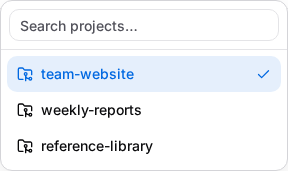
The picker lists the Projects available to your account and paired computers. An offline computer remains visible but cannot be selected; Elowen does not redirect its commands to the server. A switch is refused while a running turn, sub-agent or tracked background process uses the current target. Resolve that work and try again. A switch requested by Elowen applies after its current tool batch.
Work in a Git worktree
A worktree is another checkout of the same repository, not another Project or security boundary.
- Create one with Git, for example
git worktree add ../feature-work -b feature-branch. - In
elowen chat, use/cd <path>to work in that checkout. In a managed Project, ask Elowen to use theProjecttool'sworktrees,worktree_createorworktree_removeoperation. - Commit in the checkout you changed.
The directory must already be accessible to your account. A worktree in a managed Project uses that Project's environment; creating it does not switch the conversation to another Project.
Managed Project environments
A managed Project keeps files in its own environment. Use its environment actions to start, stop, restart, take a snapshot or restore. Check the final status: accepting a request does not mean the operation has finished. Stopping it interrupts services and commands but keeps its files and installed packages.
Restoring replaces the active environment and interrupts services, so it requires confirmation. A snapshot is not a database-consistent backup; export databases separately when consistency matters. The disk warning starts at 80% of the environment's ceiling. When the ceiling is exceeded, the environment stops until space is freed or the ceiling is raised.
Inspect load history
On Projects, open a managed Project and select its CPU, RAM, Disk or IO meter. The same history is available from running desktop previews. Choose a period and at least one resource; the default is 24 hours. Read the returned time interval and any notice that Elowen adjusted its boundaries.
History is kept for 30 days. Detailed samples cover 48 hours; older history uses hourly summaries. Missing measurements and stopped periods appear as gaps, not zero. Brief spikes may be missed, and disk readings can lag by several minutes.
Account development environment
Each account has a private HOME for Git, npm and tool configuration. Administrators can inspect its size and Git author under the account's development-environment settings. Resetting HOME removes that configuration and requires confirmation; it is unavailable while the account has active processes.
By default, commands from accounts without operator authority are confined to accessible Projects and their private HOME. Commands in a managed Project run in that Project's environment, not on the server's host directory.
Optional Project plugins
These integrations are optional: an administrator must install the plugin, and the feature must be available to your account. A plugin does not grant additional Project access.
- OneDrive can mirror a Project or selected folder, sync and inspect conflicts. It excludes Git-ignored files, dependencies, environment files, private keys and credentials. Deleted files remain in
.elowen-trashuntil removed. - Sites can publish an application already running in a managed Project. Publishing does not build, start or copy it; making a site public requires confirmation.
- Editor opens at
/p/editorand edits files only in Projects you can access.
Connect GitHub to a Project
The optional GitHub integration needs a linked GitHub account and access to the relevant repositories.
- Open Account → Linked accounts, connect GitHub and finish sign-in.
- Open the Project's GitHub tab and choose Map repository.
- Review Base repository (the pull-request target) and Push repository (where branches go). They may differ for a fork.
A Project has one mapping. Its creator or an administrator can remove it. The linked account needs read access to the base repository and write access to the push repository. Commands in a mapped Project use your linked GitHub identity for that command only; other accounts do not inherit it. A paired Computer uses its own git, gh and credentials; this instance does not store a mapping for it.
Publish and review a branch
The GitHub tab shows a repository mapping; it does not publish branches or create worktrees. Publishing and merging are separate actions that require authorization.
- Commit changes in the checkout or worktree used by the conversation.
- When publishing is authorized, push the branch with
git push. - Review with
gh pr viewandgh pr checks; create or review a pull request withgh pr createorgh pr review. Merge only when authorized.
See Autonomy & Safety.
If something does not work
- A Project is missing: check membership with its administrator or the computer's pairing owner.
- A switch is refused: finish or stop the active work named in the refusal, then choose again.
- A Computer is offline: reconnect its client. Check its state before repeating a command with an uncertain result.
- An environment is not ready: open the start operation and read its final status. Check disk use and the ceiling if startup is refused.
- A GitHub push fails: check the linked account, mapping and repository permissions. Never paste an access token into chat.
Related guides
Continue with Brain & Chat, Web UI, CLI, Autonomy & Safety or Scheduling.