Plugins
Manage plugins in Settings → Plugins. Plugins add optional capabilities to Elowen, such as tools, skills, chat channels, scheduled tasks, integrations, and Web UI pages.
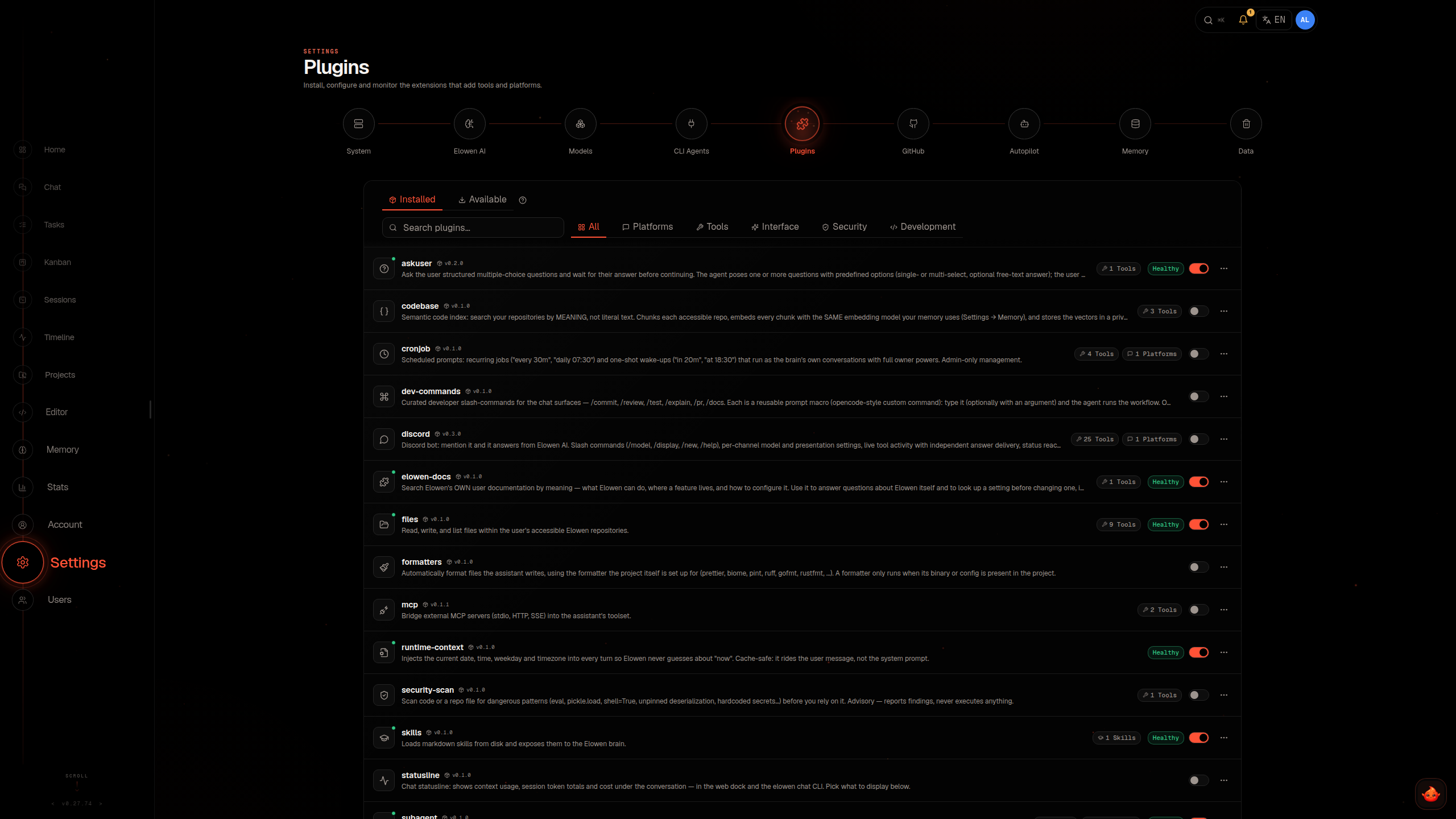
Open the plugin manager
Administrators manage two sections in Settings:
- Plugins lists the installed bundled and marketplace plugins, one card each. From here you can enable or disable a plugin, open its details, update it, or remove it, and Update all plugins updates every plugin with a newer version.
- Available plugins lists the plugins of Elowen's curated registry, one card each. Removed bundled plugins appear above that list under Removed built-in plugins. Search narrows either list and the Category filter narrows it by kind.
Choose either section in the Settings sidebar on a desktop or in the section strip on a phone.
The marketplace installs only plugins covered by the installation licence, not arbitrary URLs or local folders. The catalog is fetched from the licensing server over HTTPS with the installation licence, revalidated on each refresh and cached locally for offline use. It lists exactly the plugins the licence covers: anything outside the licence is hidden, and installing or updating it is refused. Each download is verified against the catalog checksum and size before it is installed. The catalog is separate from the Elowen package, so availability and versions can change independently of a core release.
Bundled plugins
Elowen ships eleven plugins. Nine are enabled by default; Web and Code Mode are disabled until an administrator enables them.
| Plugin | Adds | Guide |
|---|---|---|
files |
Reading, writing, editing, listing, searching and transferring files, and Git status. | Files |
terminal |
Shell commands and background processes. | Terminal |
sandbox |
Persistent managed Project environments. | Projects & Environments |
subagent |
Sub-agents and workflows. | Sub-agents & Workflows |
web |
Web search and fetch. | Web |
mcp |
Connections to external MCP servers. | MCP |
code-mode |
JavaScript tool orchestration. | Code Mode |
askuser |
Structured questions. | Session Helpers |
changelog |
In-app release notes. | Session Helpers |
runtime-context |
Date, time, timezone, sender, and chat type. | Session Helpers |
statusline |
A configurable status line under the conversation. | Session Helpers |
Optional integrations
Other plugins come from the registry and are installed separately. Their availability depends on registry version, core compatibility, configuration, host requirements, project access, and account grants.
Chat, identity, and account integrations
| Plugin | Adds | Important limit | Guide |
|---|---|---|---|
discord, telegram, whatsapp |
Chat-platform bots. | Each needs its own credentials and sender policy; platform permissions still apply. | Channels |
msteams |
Teams bot and delegated Microsoft 365 tools. | Requires Entra and Azure Bot setup; tools follow the linked account's Microsoft permissions. | Microsoft Teams |
onedrive |
Two-way sync with a Project or folder, including folder selection, pausing, manual sync, and conflict resolution. | Requires a linked Microsoft identity; remote deletions go to mirror trash. | OneDrive |
skills |
Reusable instructions and a skill manager. | Instance skills require operator authority; personal skills stay within their account. | Skills |
chatbot |
Visitor chatbots for third-party websites. | Each chatbot is a non-interactive account bound to exactly one managed Project. | Chatbot |
Scheduling and media integrations
| Plugin | Adds | Important limit | Guide |
|---|---|---|---|
browser |
Private browser sessions and page inspection, plus page capture for Sites. | Each account has its own browser; web traffic passes through the network proxy. Site capture uses a separate browser session limited to one public HTTPS origin. | Browser |
cronjob |
Scheduled prompts, one-shot wake-ups, and the Automation page. | Personal jobs run with the owner's permissions and are capped; advanced shell guards require privileged scope. | Scheduling |
image-gen, image-edit |
Generate a PNG or edit a project PNG/JPEG or public image URL; source replacement requires an explicit output path and overwrite option. | Require a configured image provider; calls can take up to two minutes. | Image Generation, Image Editing |
voice-bot |
Outbound calls through a configured service endpoint and secret. | Uses full international phone numbers; calls cannot be undone, so never guess a number or retry an uncertain call. | Voice Calls |
twilio |
Outbound telephone calls through Twilio. Publishes the phoneCalls control for other plugins. |
A regional key works only in its region. Each started minute is billed at the price you set; the per-call answering-machine detection fee is not included. | Twilio |
Project and developer integrations
| Plugin | Adds | Important limit | Guide |
|---|---|---|---|
editor, github, lsp |
Project editing, the GitHub connection and Project repository mapping, and language-server tools. | Project access applies; the editor's separate System view is for administrators, and each account connects its own GitHub identity. | Code Tools |
sites |
Managed Project previews and proxy publications. | Requires the Sandbox plugin. New sites forward to an application already running in a Project; public visibility needs confirmation. Existing file Sites retain their addresses and recovery files but serve maintenance until republished from a running Project service. File publication and rollback are no longer available. | Sites |
Business integrations
| Plugin | Adds | Important limit | Guide |
|---|---|---|---|
raynet |
Raynet CRM tools for searching, reading, creating, updating, and acting on records, plus a CRM page and a skill. | Works under a company login unless a person switches on their own credentials. The access mode caps what a turn may change, and raw API requests are off by default. | Raynet |
meeting-confirm |
Confirms tagged Raynet meetings by phone and sends exception notices to the salesperson in Teams. | Uses the raynetMeetings control from Raynet; the consumer must report unavailable when Raynet is absent. |
Meeting confirmation |
Session and productivity integrations
| Plugin | Adds | Important limit | Guide |
|---|---|---|---|
todo |
A per-conversation task list with live progress. | Installed from the registry, not bundled. | Sub-agents & Workflows |
brainstorming |
A skill that makes the agent clarify and get a design approved before creative work. | Limits are not documented yet. | Brainstorming |
stats |
Model usage statistics for tokens, spend, and cache use. | The daily trend covers at most the latest 90 days. | Usage Statistics |
Plugin guides list the tools, configuration fields, permissions, and limits for each integration. Start with a task guide for Channels, Projects and environments, Scheduling, Skills, MCP, Memory, or Sub-agents and workflows. A plugin's manifest and the Available plugins list determine its current version and core requirement.
Install and enable a plugin
- Open Settings → Available plugins.
- Find the plugin and select Install. Elowen downloads the package, verifies it, and enables it in the same operation.
- Review and acknowledge requested capabilities if prompted.
- Configure required fields in the plugin's detail view.
A plugin that declares mutating capabilities may need your acknowledgement. The request can cover access to prompts, tools, events, workflows, or users. Until you confirm, the plugin is not enabled and an update is not applied. Elowen stores which capabilities you acknowledged; if an update requests additional capabilities, it asks you to review them.
A plugin may require a minimum core version (requiresCore) or an exact shared API version (requiresSharedApi). If the running core is too old, or it does not ship the shared API version the plugin names, installation is refused. Upgrade Elowen before installing that plugin. An automatic update holds back a plugin that needs a newer core than the release being installed and advances it on a later run once the core is new enough.
Plugin changes are saved and applied by restarting Elowen. Enabling, disabling, installing, updating, uninstalling, restoring a bundled plugin, or saving its settings requests a restart, except for the few plugins that apply their settings live, such as Chatbot and Sites. The settings screen reports that the change is saved and Elowen is restarting. Running work is saved and resumes after the restart; only work that cannot resume gets a bounded wait to settle. A pending result means the change is saved and the restart is queued. A restored bundled plugin stays disabled.
Plugin dependencies
A plugin can require named runtime controls provided by another enabled plugin. Elowen checks these declarations before enabling it. If no installed provider is declared, enabling is refused. A declared provider still needs to be configured and running for the dependent feature to work. Elowen also refuses to disable a plugin while an enabled plugin still requires a control it provides.
Configure a plugin
Select an installed plugin to open its detail view. Depending on the plugin, its sections include Setup, Behavior, Capabilities, Activity, and Advanced. Use Setup for required fields, Behavior for normal settings, Capabilities to review tools and declared permissions, Activity for plugin health and recent logs, and Advanced for advanced fields and stored-data details. Settings are defined by each plugin and may include provider or model selectors, text, numbers, options, or other fields. Saving settings requests a daemon restart, unless the plugin applies its settings live.
Secret fields are write-only. Elowen stores credentials in its encrypted secret store and does not return their values to the Web UI.
Administrators enter every plugin's keys, tokens and passwords in one place, Settings → Access. Each enabled plugin that needs them is one row with its status: Connected, Required details missing, Reconnect needed when a stored value can no longer be read, or Not set. Expand a row to enter or replace its values. The plugin's detail view no longer shows these fields; its Setup tab shows the same status and Open in Access, which opens that plugin's row. Personal credentials stay under Account → Personal plugin settings, and AI provider keys stay in the AI provider settings.
Some plugins provide per-account settings under Account → Personal plugin settings. Each account has its own values; a plugin cannot read another account's settings.
Grant a plugin to an account
Some plugins are marked user-grantable. To grant one:
- Open Users and select an account.
- Under Granted plugins, select Manage.
- Choose the plugins the account may use and save.
An empty selection grants no user-grantable plugins, including for administrators: an admin account needs its own grant for a user-grantable plugin the same as any other account. A grant makes the plugin's gated tools, API routes, pages, contributed skills and plugin-contributed commands available, subject to the account's other permissions. It does not gate every plugin contribution, such as prompt fragments, platform prompts, or hooks.
Troubleshoot missing tools or pages
Check that the plugin is enabled in Settings → Plugins, the account has its grant if required, and its configuration is complete. Then review the plugin's Capabilities and Activity tabs.
The /tools command exists in the CLI only and is administrator-only; it is not a member-facing list of tools. Administrators can use it to inspect plugin tool owners, descriptions, and schema summaries. For other accounts, use the command catalog and the plugin's granted surfaces to check availability.
Update, disable, remove, or restore
- Update a marketplace plugin from its card in Settings → Plugins when a newer version is available. Installing or updating a plugin outside the licence is refused.
- Disable a plugin to stop loading its contributions after the daemon restarts.
- Remove a bundled plugin to hide it and stop loading it; it reappears under Removed built-in plugins in Available plugins, where Restore brings it back disabled.
- Uninstall a marketplace plugin to remove its files and plugin-owned persistent data. This cannot be undone from the UI.
Plugin changes restart the daemon so it can rebuild its plugin registry. The restart waits for running turns up to a limit, then proceeds. If the licensing server is unreachable during startup, an enabled plugin may remain unavailable until it can be reached. The plugin stays enabled in settings; its contributed route reports temporary unavailability rather than appearing to have never existed.
Safety
Plugins run as part of Elowen, not in isolated browser sandboxes. The curated registry does not prevent a plugin from adding network integrations, tools, pages, or other runtime behavior. Install plugins you trust and review the capabilities they request, especially access to prompts, tools, activity, workflows, or users.
For account-level tool and model restrictions, see Users & Access. For the general settings layout, see Configuration.