Configuration
Configure Elowen in Settings, set personal defaults in Account, and use startup environment variables for the daemon and web process.
Where settings are stored
Elowen stores core settings, accounts and conversation history in PostgreSQL. Set ELOWEN_DATABASE_URL to the provisioned database connection URL before starting the daemon. There is no default database URL.
Instance files live under ELOWEN_INSTANCE_ROOT, which defaults to $HOME/.config/elowen. This directory contains plugin-secrets.key, provider credentials, plugin data, plans, attachments and large tool results. Logs default to its logs subdirectory. The instance root is independent of the database URL. Back up the key and instance files together with the database: without the key, encrypted plugin secrets cannot be read.
Startup environment variables
Set environment variables before starting the relevant process. Defaults are for a local installation. The installer writes the protected database URL and pinned instance paths to /etc/elowen/instance.env; installed services load that file. Keep connection credentials out of command arguments and logs.
| Variable | Default | Purpose |
|---|---|---|
ELOWEN_HOST |
127.0.0.1 |
Daemon bind address. |
ELOWEN_PORT |
4400 |
Daemon HTTP port. |
ELOWEN_DATABASE_URL |
Required; no default | Protected PostgreSQL connection URL. |
ELOWEN_INSTANCE_ROOT |
$HOME/.config/elowen |
Absolute, canonical directory for instance files. |
ELOWEN_LOG_DIR |
<instance root>/logs |
Log directory. |
ELOWEN_LOG_LEVEL |
info |
Minimum file and console log level. |
ELOWEN_PROJECT |
elowen |
Default project name. |
ELOWEN_PROJECT_PATH |
$PWD; the service HOME for installed services |
Default project path. |
ELOWEN_DAEMON_URL |
unset for CLI | Explicit daemon origin for direct CLI access and the web process. With ELOWEN_URL, overrides CLI hooks and the live socket. |
ELOWEN_URL |
unset | Public CLI instance origin or its /api base. Without either URL variable, CLI uses the local daemon. |
ELOWEN_AUTOSTART |
1 |
Set to 0 to disable CLI auto-start. |
ELOWEN_BOOTSTRAP_USER |
unset | Initial administrator username; requires the password variable too. |
ELOWEN_BOOTSTRAP_PASS |
unset | Initial administrator password; requires the username variable too. |
PI_OFFLINE |
unset | Any value stops the background worker fetching the model catalog from pi.dev and the Fast-mode model list from models.dev (for hosts without internet access). The providers configured for chat are still asked for their own model lists. |
The packaged launcher uses ELOWEN_WEB_PORT (default 4500). The web server itself reads PORT and HOSTNAME. The daemon and web UI are separate processes. Use elowen setup to configure a local installation and elowen doctor to check readiness.
Settings sections
Open Settings as an administrator. Most changes save automatically; settings forms may show a conflict if another editor saves first. Review the current value before retrying a change.
AI Plugin credentials are entered once in AccessAccountConfigure AI providers
Linked accountsAdd accountAI providersAdd providerAdd provider asks for OpenAI-compatible or Anthropic API, the endpoint URL and the API key. An OpenAI-compatible endpoint also offers the wire API, the compatibility options, a temperature from 0 to 2 and a model list. Leave temperature unset to omit it from requests. The provider's name is edited in its drawer; its ID is derived once from that name and never changes. A pasted-key account arrives with its name, fixed endpoint and wire format filled in, so only the key is entered.
For compatible endpoints, Elowen tries /models when possible. If it cannot get a usable catalog, enter model IDs yourself. Automatic wire selection follows each model's native catalog format when known. Otherwise, first use checks Responses and then Chat Completions in the background, while your request begins immediately on the default API. A successful result is remembered; the next conversation message uses it. Refused or temporarily failed checks leave the default in effect. The Models row in the provider's General tab opens the picker, and each model there shows its effective API. Model limits offer Reset API beside Auto when that model has a remembered detection. Explicit provider or model choices take precedence. Enable compatibility options only if the endpoint supports them.
For supported providers, the provider's Advanced tab holds Code mode. It applies to every model of that provider. The model gets a JavaScript execution surface for calling tools; nested calls still follow normal permissions and approvals.
The browser never receives an API key after it is saved. It shows only whether a key is stored.
Supported OAuth connections are Anthropic, OpenAI Codex, GitHub Copilot, Kimi, xAI (Grok), Meta (Muse), and OpenRouter. Start or disconnect them from the provider cards. Some providers require authorization in a separate page or a code pasted back into Elowen. Connected accounts show their usage windows when the provider reports them: Anthropic, OpenAI Codex, Kimi, xAI, Meta, and OpenRouter. GitHub Copilot has no usage display. Pasted-key accounts that report plan usage — Command, MiniMax and Opencode Go — show their windows under Account usage.
Manage models
Open Settings → Models to control the workspace catalog.
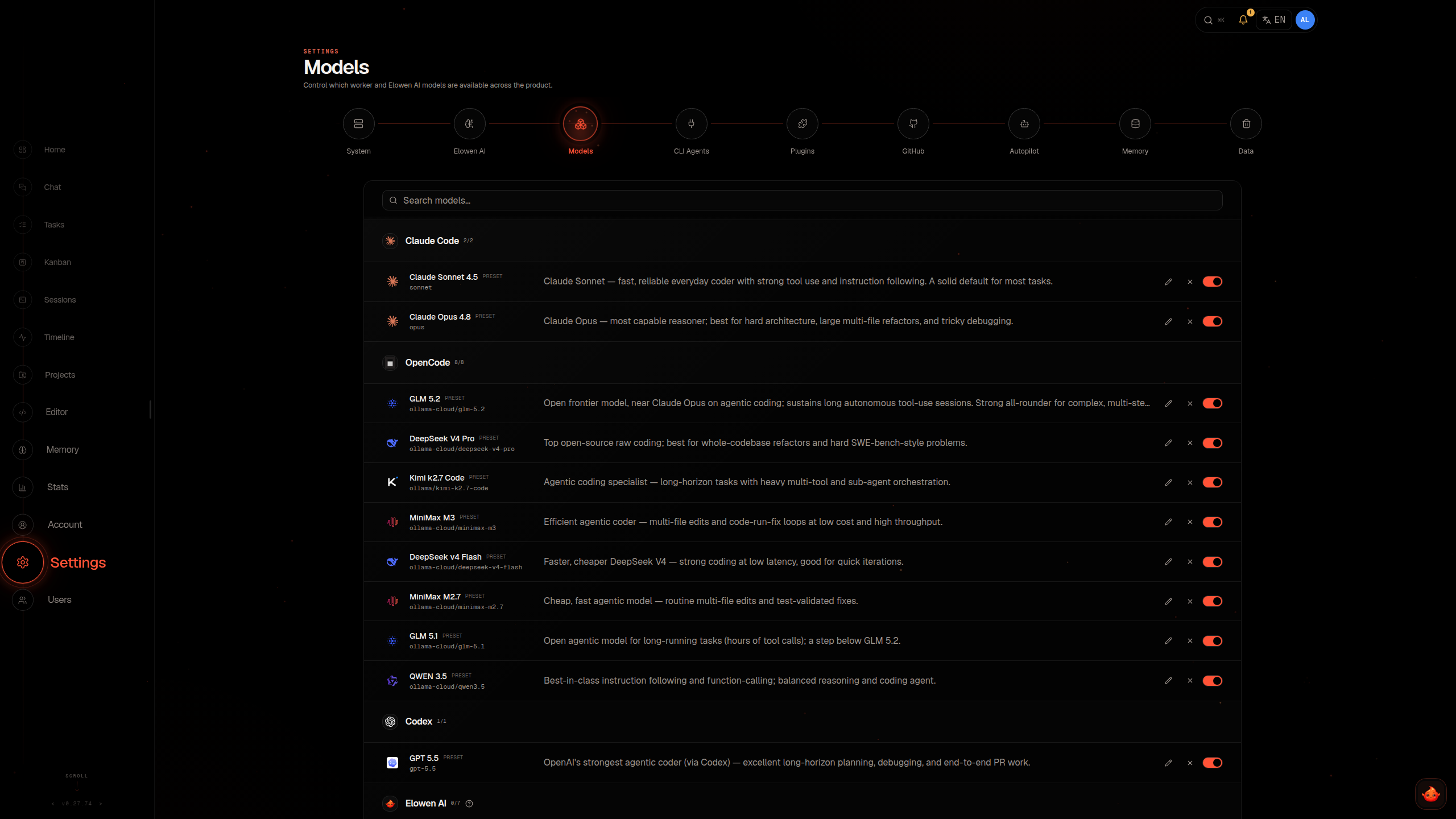
You can see which models each provider offers and how many, and search the catalog by provider, model ID or exec name. Select a model to set its limits: context window, maximum output, whether it accepts images, prices per million tokens, and the resize applied to incoming images. Overrides apply to the exact provider/model pair. Elowen keeps room for the prompt when applying an output limit. The default maximum output is 8,192 tokens unless the provider or an administrator supplies another value.
This catalog sets what the workspace offers. A user can select only an offered model that their account is granted.
Set account-level AI preferences
Users manage personal defaults under Account. Account → Models holds the default chat model, the supported reasoning level, the vision fallback, the compaction model and threshold, YOLO, unattended-run behavior, and the permission rules; Account → Personality holds the communication style and personal instructions; Account → Memory holds the memory settings. None of them changes the workspace provider catalog.
Automatic compaction is enabled at 80% of the model's context window by default. A model-specific threshold can override the account default. If no compaction model is selected, every provider uses the chat model, including ChatGPT OAuth. An unavailable or revoked personal compaction model also uses the chat model.
A vision model is only a fallback for image turns when the current model is not known to support images. Later text-only turns use the normal model.
Set runtime limits
Common brain-limit defaults include 100 tool-output lines, 41,000 output characters, 120,000 bytes inline per result, and a 200,000-byte total inline budget per turn. Elowen allows three consecutive automatic compaction failures and waits up to six hours for an answer to a question. A refused or failed compaction summary is sent again up to two more times by default (Compaction summary retries, 0 to 5) before the built-in summarization runs instead. It recalls up to 10 memories at turn start, with a shared 20,000-byte (UTF-8) budget, and keeps up to 32 live channel sessions in total; the least recently used one is dropped, and its history stays in the database.
The local shell timeout defaults to 30 seconds. Step-context summaries follow every 20 tool calls, and automatic memory curation allows two operations per run. Event and origin-IP records are retained for 30 days by default.
Plan mode suggests up to three read-only explore agents and three plan agents by default. Plan mode: explore agents and Plan mode: plan agents each accept 0 to 5. Automatic skill review is tuned by Maximum skill changes per exchange (default 1, range 0 to 6), Skill review every N tool calls (default 100, range 1 to 200), and Minimum tool calls for a skill review (default 1, range 1 to 200).
The skill-review default applies only when no explicit interval is stored; your saved value stays in place. Reviews consider the completed conversation context on the same model and provider account. They may be skipped when the provider route is not verified or capacity is unavailable, or an OAuth account has used at least 90% of its weekly allowance or its allowance is unknown. Skipped work keeps its count for a later eligible exchange. Setting the write budget to 0 disables automatic learning.
Automatic memory maintenance has two more limits here: Memory dreaming: hours since the last pass (1-168, default 24) is how long an account must have gone without a maintenance pass before the next one may start on its own, and Memory dreaming: conversations since the last pass (1-50, default 5) is how many of the account's other conversations must each hold a finished exchange since the last pass. A pass reconciles memories across conversations, so a shorter interval or fewer conversations means more passes and a higher cost; the changes apply to the next check without a restart. Users turn the feature on for their own account under Account → Memory (see Memory), where Run now ignores both limits.
The same section controls automatic tool deferral, sub-agent execution, provider request capture, event retention, and memory retention. Tool deferral is enabled by default with a threshold of 10 tools; above it, only the core tools (Bash, Read, Edit, Grep and Write) stay fully loaded. The sub-agent runner is enabled by default and sizes its pool automatically. Provider request capture is enabled by default; turning it off stops new captures but keeps existing records.
Configure memory
Open Settings → Models for the workspace embedding and categorization models. The embedding model supports semantic retrieval; without one, memory still works with keyword search. The categorization model assigns memories to categories. Both use the selected provider's endpoint and API key. Connected OAuth accounts cannot be used for embedding, except OpenRouter, whose account credential includes an embeddings endpoint.
After changing the embedding model, rebuild the index: Memory maintenance on the Memory page offers Rebuild the memory index, and after changing the categorization model or memory categories it offers Reorganize memories with Reorganize all memories. These operations run in the background. Documentation search is not part of that rebuild: it re-indexes itself in the background with whatever embedding model is configured, and answers by keyword until it catches up.
Set automatic memory retention
Memory retentionEdit retentionManage plugins
Use Settings → Plugins for the plugins installed here and Settings → Available plugins for the registry you install from. Depending on the plugin, you can enable or disable it, inspect its capabilities and health, edit its settings, install or update it, uninstall marketplace plugins, or restore bundled plugins. Enabling or disabling a plugin requests a daemon restart; running turns can delay activation.
Plugin settings are validated against the plugin's manifest. A successful change is saved before Elowen restarts the daemon to load it, and the page can show Saved; activation pending while the restart is waiting. Keys, tokens and passwords are entered in Settings → Access instead: each enabled plugin that needs them is one row with its status, the explicit Save action sets or replaces a value, and a stored secret is never returned to the browser.
Some plugins also provide personal settings under Account. Those settings belong to the current account and do not reload the instance plugin registry.
Plugin grants and tool permissions are separate. An administrator can grant a user-grantable plugin's gated tools, API routes, UI, and contributed skills to an account. The account's tool permissions can further restrict tools. Prompt fragments, platform prompts, slash commands, and hooks are not gated by the plugin grant.
System, updates, and data
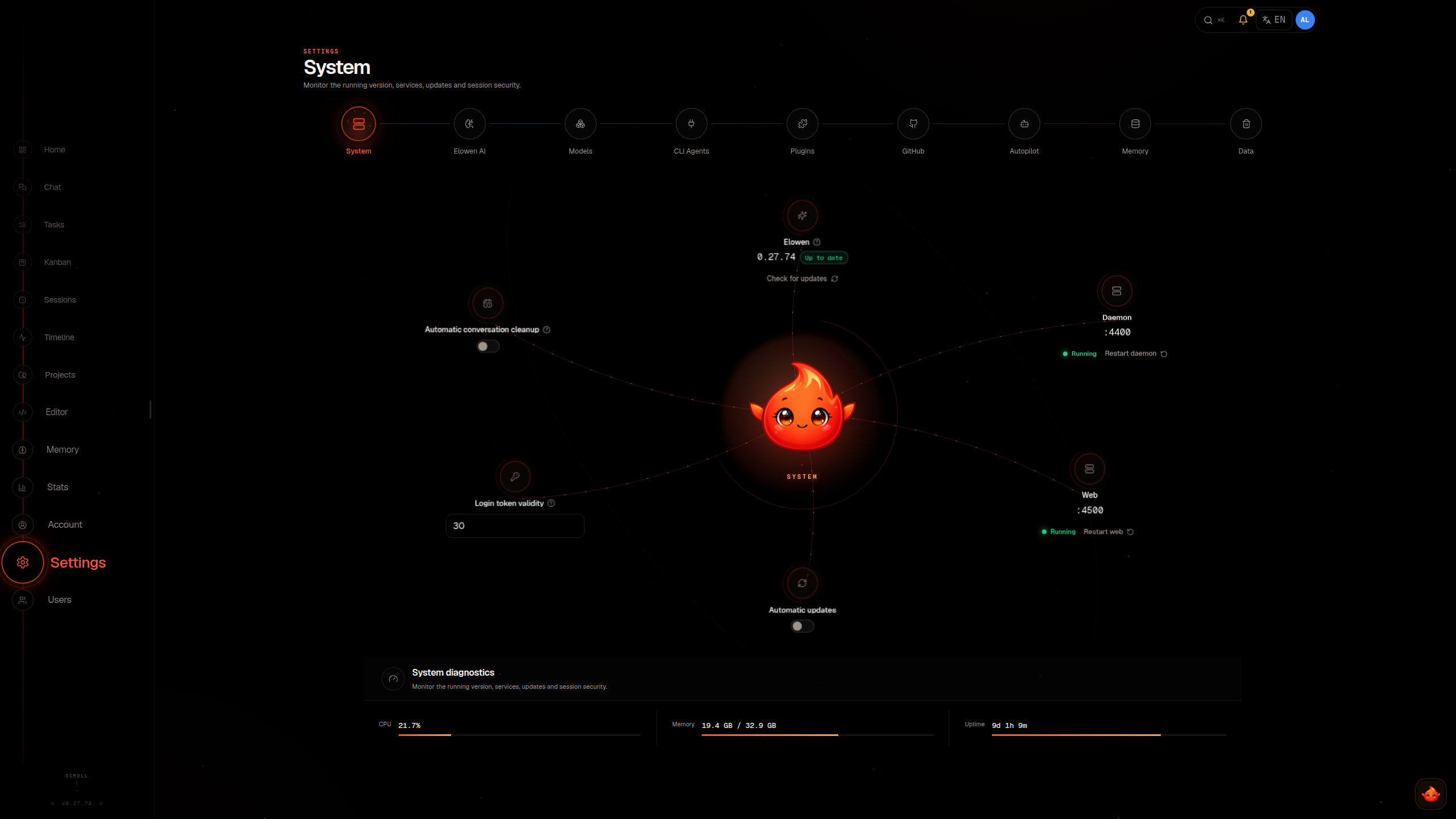
The System section reports service status, provides restart controls, and shows update availability. Automatic updates are off by default; enabling them opts the instance into the unattended update check, which looks for a new release about once an hour and reacts within a few minutes when the publisher asks every opted-in instance to update. An update prepares its download while services keep running, then briefly stops the affected services, applies the changes and starts them again for boot checks. If those checks fail, recovery attempts to restore the previous set; failed recovery may require operator intervention. See Production & Updates for update status and recovery.
Skins in Settings → System chooses which built-in and custom designs accounts may switch between from the top bar; with fewer than two allowed, the switcher is hidden and everyone sees this deployment's configured design. Custom skins lets an administrator add a skin by id, display name, a built-in skin to base it on, and a CSS token sheet that may only override public design tokens; it is validated when added, and a refused skin reports the token or line to fix. Adding or removing a custom skin applies at once, in every open page. The token sheet can override the built-in design’s chat colors, shadows and sans or monospace family. Shadows accept none or a comma-separated list of shadows, each with optional inset, two to four lengths and a color.
To use a font that is not installed on the viewer’s device, open Custom skins, enter its Font family, choose a WOFF2 file, and select Upload font. Use the same family in the skin’s token sheet, for example --font-sans: "Manrope", sans-serif;. Each skin holds one normal variable font file up to 2 MiB. The instance serves it to every viewer, including on the login page. Remove font removes that file; deleting the skin removes its font too. Keep resource URLs and @font-face out of the token sheet: the instance generates the loading rule.
Conversation retention is enabled by default for conversations idle for 10 days. Active sessions, delegated work, and platform sessions are protected from this cleanup. The Data section provides logs and provider request diagnostics. Disabling diagnostics capture stops new records but does not delete existing ones.
Back up Elowen
Elowen has no built-in backup or restore command. Back up the PostgreSQL database, including plugin schemas, and the complete instance root. Stop the instance's writers while collecting both so the database and files describe the same state. Preserve plugin-secrets.key, provider credentials, plugin data, plans and attachments, plus any logs stored outside the instance root.
Use PostgreSQL backup tools with protected credentials. For example, after configuring a libpq service named elowen-backup for a direct connection to this instance's database:
PGSERVICE=elowen-backup pg_dump --format=custom --file="/backup/elowen-$(date +%Y%m%d).dump"Keep the required PostgreSQL roles and access configuration with your recovery procedure, and test restoring the database and instance files together in an isolated installation. The daemon applies core schema migrations at startup; runner and background-worker processes do not migrate. Restoring only the database omits the instance files and the key needed to decrypt plugin secrets.
| Section | What it controls |
|---|---|
| System | Version and service status, restart actions, automatic updates, push contact, login token validity, conversation retention, skins, problem reporting, licence and host diagnostics. |
| Assistant identity, linked accounts and providers, runtime limits, tool loading, sub-agents, and memory retention. Named after the configured assistant. | |
| Models | Model roles, the model catalog with context and output limits, prices and image handling, and the workspace memory models. |
| Plugins | Installed plugins: enablement, capabilities, health, settings and updates. |
| Available plugins | The plugin registry, with installation of extensions. |
| Access | Keys, tokens and passwords that plugins use to reach their services. |
| Dashboard | Recap, digest, greeting, quick actions, and continuation settings. |
| Voice mode | The voice provider, its models, and call length limits. |
| Data | Logs and provider request diagnostics. |