Brain & Chat
Use Chat in the Web UI to work with conversations, models, tools, memory, and delegated work. The server runs each turn and applies your account's permissions. The CLI and supported chat channels use the same server-side Brain.
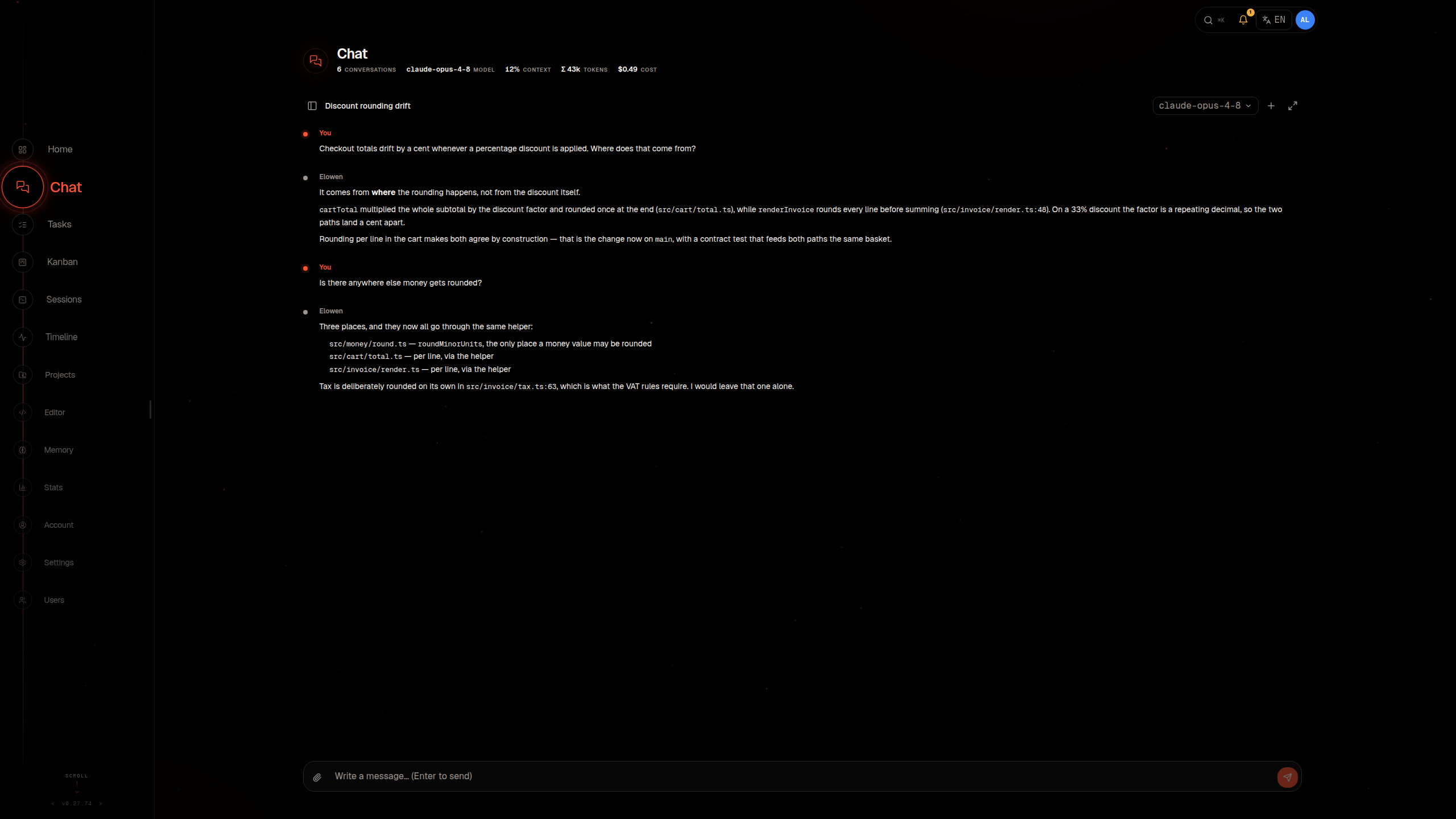
Open chat and choose a conversation
Open Chat in the Web UI to use the full conversation view. Conversations opens the same list from chat, the dock or the sidebar. Mine contains your conversations; administrators can also choose All conversations. The window resets to Mine when reopened. On a phone it fills the screen and keeps a link back to the dashboard.
Search conversation names and transcript text, then combine Project, Status, Model and Type filters. Administrators can also filter by the hosting account, not the last writer in a shared room. Choose several values within a filter to include any of them; different filters narrow the results together, and the Project, Status, Model and Type options carry the marks their rows show. Transcript search starts after two characters and returns a limited set of the newest matches. A matching snippet replaces the normal state line; idle rows do not show a latest-message preview. Unread in All applies only to your own conversations.
Newest groups conversations into Today, Yesterday, This week and Older in your local timezone. Pinned conversations stay first in Mine. Other sorts, including Name and Tokens, order the complete results rather than each date group. Pages count parent conversations, not expanded schedules or delegated work, and each page holds 30. New opens the Project chooser before creation.
On a wide window a row also shows the conversation's tokens and cost. A conversation that is working shows its live generation speed and cache hit too, wherever that work runs.
Use a conversation's More actions menu to rename, pin, fork, export, delete or open its Sub-agents where your permissions allow it. The icon control at the end of a row changes the conversation's saved icon. Branch conversation opens a copy and leaves the original untouched. Foreign and channel conversations open read-only. Read-only sessions keep the message field locked and explain why. The live view can show todos, delegated work, workflow steps, tool calls and background processes, and a running sub-agent can be stopped from its own row there.
Choose Select to reveal checkboxes, including on touch devices. Select page includes only matching parent conversations on that page, not rows shown only for context or a row being renamed. Changing search, filters, sort or page clears the selection. Export selected offers HTML or JSONL and starts a separate download for each conversation; your browser may ask you to allow multiple downloads. A started request does not prove the browser saved a file. Delete selected asks for confirmation, retains failed selections for retry and deletes the active conversation last. Administrator Delete all is separate: it removes all managed conversations across all accounts, including channels and delegated conversations, regardless of the current filters or search.
The Options button in the composer holds the work mode and, when voice is enabled for your account, Call and Dictate.
In the CLI, run elowen or elowen chat. Supported chat channels, including Discord, Telegram, Microsoft Teams, and WhatsApp, also use the server-side Brain. Each surface shows the controls it supports, but none can grant itself access to a model, Project, tool, or permission.
Only one turn runs in a conversation at a time. A message you send while a turn runs is queued in that turn and delivered after the current tool calls, so the agent sees it before it finishes. If the turn ends first, the message starts the next turn. In the CLI, press ↑ with an empty composer to recall the newest queued message, and press Ctrl+X, then x, to remove it. In Web chat, use the remove control beside the queued message. To guide a running sub-agent, send your message to the parent conversation; the parent can pass it on with DelegateContinue.
Use /new to start a fresh conversation. In Web and CLI, /clear empties the current conversation while keeping its identity. The Web history panel and CLI session picker let you select and manage conversations.
A CLI launch reports its working directory and resumes the most recent conversation for it that is not attached elsewhere. It does not take over a conversation another client is actively using. Select a session explicitly with /resume when you want to continue a particular conversation.
Interactive answers
In Web Chat, Elowen can show a small interactive answer such as a chart, comparison or selector. Ask for an interactive explanation when changing a value or exploring alternatives would help. Some views let you explore locally; others wait for a choice. A required choice goes directly back to the agent without adding another chat message, and remains available after a page reload or server restart. Use Stop to cancel a pending choice.
Views follow the current light or dark appearance. Conversations you can only follow, including delegated work, keep their controls locked. The CLI, HTML exports, Discord, Telegram, WhatsApp and Teams show a short text summary without buttons. An agent cannot wait for an interactive view on those surfaces.
What happens after a restart
Conversation history and settings are saved separately from the live provider session. After a restart, Elowen restores the conversation and resumes work only when it has a valid recovery record. Supported interrupted work can continue; work that cannot be resumed safely may be parked or ended with its completed portion preserved rather than run again blindly. A live response may reconnect and refresh the transcript.
If sending a message fails, the editor restores its text when you have not started a newer draft and keeps both submitted and newly attached files. If you switched conversations before the failure arrived, an error tells you the message to the previous conversation was not sent. The previous message and its attachments are not restored when you return; your current draft stays unchanged.
Starting a new conversation is always your choice. A one-shot wake-up returns to the conversation that created it when that conversation is yours or a direct chat; in a shared room, it runs in its own conversation named after the job. A recurring job created in a direct platform chat reports back to that chat. One created anywhere else, including web chat and shared rooms, has its own conversation named after the job for its results.
Use chat commands
The message field uses a shorter hint on phones and in the compact assistant dock. Type / in Web or CLI chat to see the commands available there. Common commands include /new, /clear, /stop, /stats, /compact, /model, and /reasoning. /plan, /build, and /workflow switch the work mode. See Work Modes & Steering. In Web chat, /help opens a filterable list of the commands.
There is no current /status command; use /stats for session information. Some commands are limited to one surface, an administrator, or an enabled plugin. See Slash Commands for details.
What you see in the conversation, and what the agent sees
Between your messages and the replies, the conversation shows short rows for things that happened. The agent reads the same rows as part of the conversation, so it knows what you know. They stay in the transcript after a reload or a restart, and appear in the web chat and in the CLI.
- Stop: when you stop a reply, a row such as "Interrupted by user" appears. The text written so far stays in the conversation and the agent sees it, so you can say "continue" or redirect it. A turn that hits its step limit, or is stopped by the agent that delegated it, shows its own row. A reply you discard with Esc before any output leaves no row.
- Errors: a failed request shows one clear error row, the same everywhere. Elowen's own messages, such as a refused image, exhausted retries or a stopped automatic compaction, are worded in your language. A provider's own error text is shown as it came, with technical details kept only in the daemon log. The agent sees the error too.
- Switches: a change of model, work mode (Plan, Build, Workflow), reasoning level, conversation title or working folder appears as a row, and the agent is told about it. This also holds for a change made while the conversation was closed, or from another client. A work mode change made during a running turn takes effect at the turn boundary.
- Commands:
/compact,/goal,/fastand/restartleave a row with their outcome, for example "Conversation compacted", "Not compacted: nothing to compact yet", "Goal set: ..." or "Fast mode on for this model". If a command fails, the row carries the exact error. On the chat platforms, these commands are recorded in that chat's conversation too. !commandin the CLI: the command and its output appear as a console block, and the agent reads them on its next request, with the output shortened when it is very long. Your next message is sent exactly as typed. A command that was stopped, ran too long or printed too much says so in its row.- Messages sent while the agent works: a message you send during a running turn is delivered to the agent after its current tool calls. The agent is told that it arrived while it was working and that it must address it before finishing, so it does not get lost.
- Delegated work: when a sub-agent or workflow finishes, a row shows its name, task and outcome at the point where the result reached the conversation.
- Refused tool calls: when a policy refuses a tool call, for example a write outside the plan file in Plan mode, the tool row shows the refusal the agent read.
Each assistant reply has a work log. While it runs, its header shows Working…; afterwards it reads Worked for 24s, Stopped after … or Failed after …. The reasoning, tool rows and interim text fold into the work log, and the reply itself stays visible. History without a stored duration shows Work log.
The agent also knows which model it runs on, because its instructions name the exact provider and model.
Choose a model and reasoning level
Set your default model in Account → Models. To change the model for a conversation, use the model picker in Web chat or /model in chat. The available catalog depends on providers configured by the administrator and accounts connected for your use. Changing the model keeps the conversation.
Reasoning controls are model-specific. Elowen shows only levels supported by the selected model. In Web chat, expand a model with reasoning levels in the statusline or /model picker to see a draggable scale under it: dragging it for the active model applies the new level to that conversation right away, and dragging it for a different model switches to that model and applies the level together. In elowen chat, use /reasoning.
The selected level updates immediately. For Anthropic models that apply effort per message, changing it while tools are running takes effect from the next user message containing new input. Tool results alone do not activate the change. New input can also arrive through steering or an automatic note, so it need not wait for your next manually sent message. Lowering the level during a tool loop therefore does not immediately lower the provider's effort or cost.
Fast is off by default and is chosen per model. Turn it on or off for the model of the current conversation with /fast on or /fast off, or inspect it with /fast status; other models keep their own choice. A model or provider that does not support Fast says so and is left unchanged.
Make room with context compaction
A conversation's context contains recent messages, instructions, tools, relevant memory, and other information needed for the current turn. When it grows, compaction summarizes older history to make room.
Automatic compaction is enabled by default and starts at 80% of the model's context window. In Account → Models, you can turn it off or set the global threshold from 30% to 95%. Set a separate threshold for individual models when needed. The setting applies to existing as well as new conversations. Channel conversations keep automatic compaction enabled and use the composing account's threshold.
You can choose a separate Compaction model in Account → Models. It can use a different provider from your chat model. When left empty, every provider uses the selected chat model, including ChatGPT OAuth, so summarization can reuse the conversation's cached context. An unavailable or revoked personal compaction model also uses the chat model.
Run /compact when you want to summarize older history immediately. In Web and CLI chat, add a short instruction about what to preserve:
/compact Keep the deployment decisions and files changed so far.Compaction does not delete long-term memories. If there is nothing to summarize, the command does nothing. If compaction fails, Elowen reports the failure instead of claiming it shortened the context. After repeated automatic failures, Elowen stops trying automatically for that conversation; you can still try /compact yourself or start a new conversation. Administrators tune how many failures in a row trigger this in Settings → <assistant name> AI → Limits ("Compaction failure limit", 1–10, default 3). The same section sets Compaction summary retries (0–5, default 2): how many times the summary request is sent again after a transient error or a refused answer, before Elowen falls back to its built-in summarization.
When you return to a conversation whose prompt cache has provably expired, Elowen may compact it at the start of that turn, before the first provider request — but only when compacting costs less than re-caching the full history. Nothing is ever compacted for a conversation nobody returns to, and never while automatic compaction is switched off.
Know when the prompt cache drops
Providers keep the recent prompt prefix cached, so a follow-up request reuses it instead of re-reading everything. With the default long retention the cache stays warm for about an hour of quiet; with short retention, about five minutes. A request after a longer gap re-reads the full history, which costs more but is normal.
A drop inside the warm window means the request reused less of the cached prefix. Elowen watches for these breaks and, when one step costs at least $0.25 extra, raises a warning alert on the bell in the top bar — at most one per response. The alert names the conversation (and the sub-agent, for delegated work), states the likely cause, lists labelled facts such as tokens lost, tokens processed again, extra cost, and the model, and links back to the conversation.
The monitor can identify changes to the system prompt, tool set or earlier history. With an unchanged prefix, provider eviction or routing and an Anthropic lookback miss remain possible explanations. Anthropic checks up to 20 positions including each breakpoint: a contiguous run of tool calls counts as one position, as does a contiguous run of tool results within one message. Twenty new positions can move an earlier write outside the final breakpoint's window, but another breakpoint can still reach it, so the position count alone does not prove the cause. A switch between Plan, Build, and Workflow changes neither the system prompt nor the tools, so it does not explain a drop.
Remove the latest messages with rewind
In Web chat, press F9 with the chat focused to rewind the conversation; in elowen chat, the same key applies. The first press stops a streaming reply; the next press removes the latest messages from history.
Rewind is guarded: it refuses while the conversation is compacting, settling, holding a queued message, waiting on a question, running a goal, or in the middle of an unsettled turn. It removes history only — actions already performed are not undone, and detached background work keeps running.
Attach files
Use the attachment button, paste a file from the clipboard, or drop files onto the message field. Audio such as MP3, archives and other binary files are accepted along with images and text. Files are stored in the conversation's current Project without changing their contents; the message gives Elowen their paths. Uploads need a Project you have access to.
Large files upload in parts. Wait for the attachment to finish before sending, or cancel it using the control beside its progress. A failed upload shows an error and is not attached. Switching conversations cancels pending uploads and clears their attachments from the message field. Files that already finished remain stored in their original Project. Read-only conversations cannot receive uploads.
Send and edit images
When you send an image, Elowen keeps the selected model if the model catalog lists it as able to read images. Otherwise an optional Vision fallback model in Account → Models can handle that turn; a later text-only turn uses your normal model again. If no Vision model is set, the current provider decides whether it can process the image.
When the model reads an image file with the Read tool, Web chat also shows that image inline. Clicking an image opens it full size in the image viewer.
The optional image-gen and image-edit plugins add image tools. An administrator must install and enable them, and configure an image provider and select it in each plugin's settings. Image generation creates an image from a text prompt and saves it in the Project; the image model chooses its size. Image editing takes an existing PNG or JPEG from the Project or a public image URL and saves the result as a new file, leaving the source untouched by default. Both can take up to two minutes.
Use memory and skills
In Account → Memory, you can change the personal settings for automatic memory recall and recall while Elowen works. Both are enabled by default for user conversations. Recall while working does not pause the current response; a result that arrives is available on a later model call. Administrators set recall budgets in Settings → <assistant name> AI → Limits.
In shared chat channels, memory is scoped to the account linked to the sender. An unlinked sender does not receive personal memories, and one sender's private memories are not exposed to another. Eligible members can also use an administrator-configured shared Project memory pool. See Memory & Embeddings for categories, retention, and Project access.
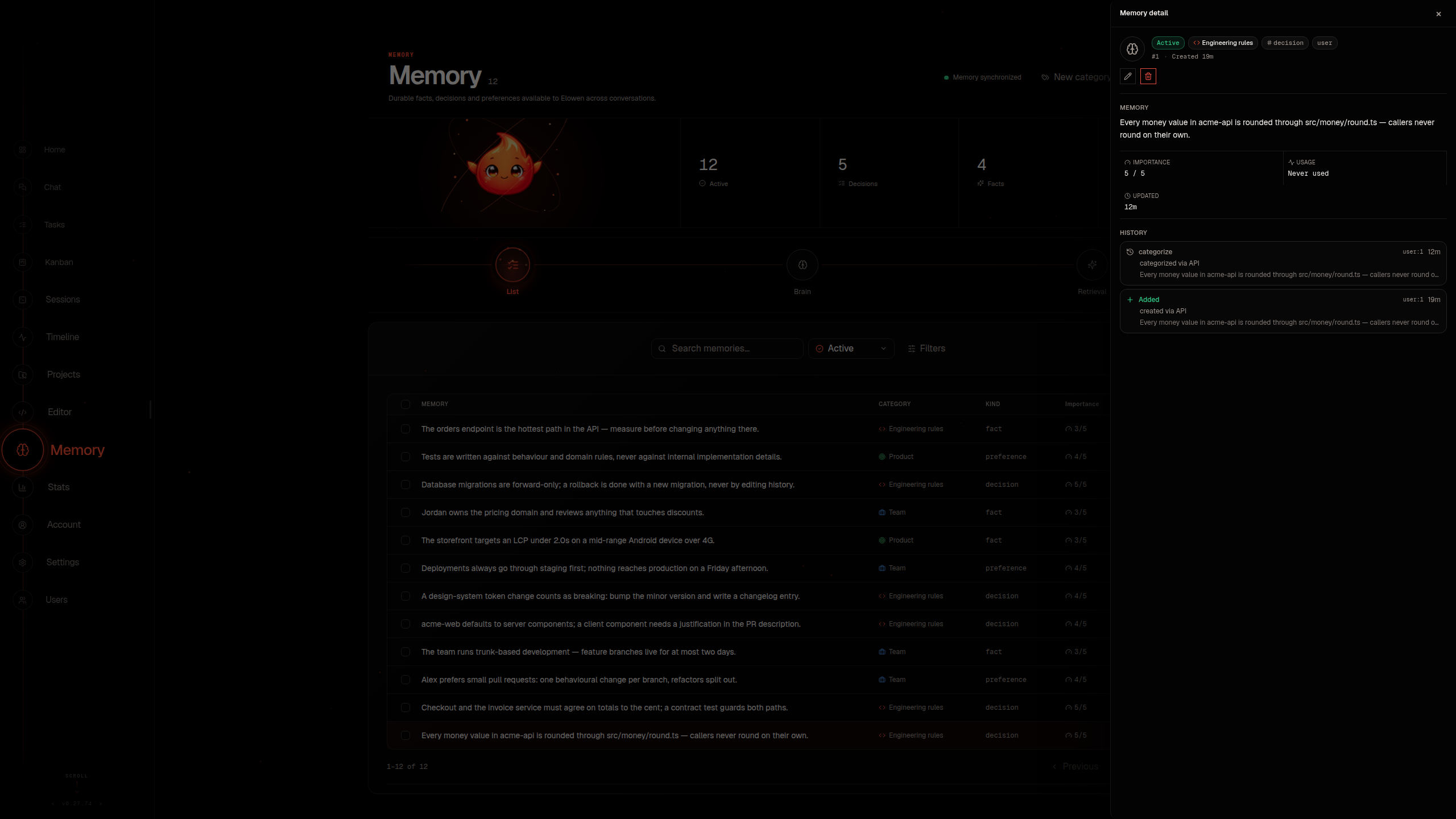
Available skills are included in the next turn's context. Creating, deleting, or disabling a skill takes effect on the next turn without a daemon restart. See Skills.
Tools, approvals, and safety
Tools come from Elowen and enabled plugins. Before a tool runs, the server checks Project access, tool permissions, and approval rules. Some requests pause interactive chat until you approve or deny them. Approval prompts cannot be answered in unattended work, such as scheduled jobs, channels, or sub-agents. Ask rules are allowed automatically by default or blocked in strict mode; explicit allow and deny rules still apply, and YOLO does not override strict blocking.
The optional YOLO setting can automatically approve eligible tool requests, but explicit deny rules still apply. Configure your account's YOLO default, unattended approval behavior, and granular rules in Account → Models. In the CLI, /yolo changes approval for the active conversation. Read Autonomy & Safety before enabling automatic approval.
Use Code mode
An administrator can enable Code mode for a provider in Settings. Supported conversations then get an exec tool that accepts JavaScript and can make dependent tool calls in one model turn. Each call still follows the same permissions and approval rules as a direct tool call. The setting applies to every model offered by that provider, so check that it works with the models you use before enabling it broadly.
Choose Plan, Build, or Workflow
Choose a mode from the Options menu in Web chat, or with /plan, /build, or /workflow in Web, CLI, or a chat platform. On a chat platform, only an administrator can switch modes. The selected mode applies to later messages; changing it does not send a message.
- Plan works out an approach before editing and uses a narrower write policy.
- Build implements changes with tools.
- Workflow coordinates dependent work with sub-agents.
Modes do not grant extra permissions. See Projects, Environments & GitHub and Autonomy & Safety.