Turn automatic recall and saving on or off
Three switches under Account → Memory decide whether Chetty looks things up and whether it remembers new ones.
Choose what runs
- Open Account → Memory.
- Set Automatic memory search. It is on by default and searches when your message arrives.
- Set Search while preparing a reply. It is on by default and searches again while Chetty works through files.
- Set Auto-save. It is off by default and saves a lasting fact after each reply.
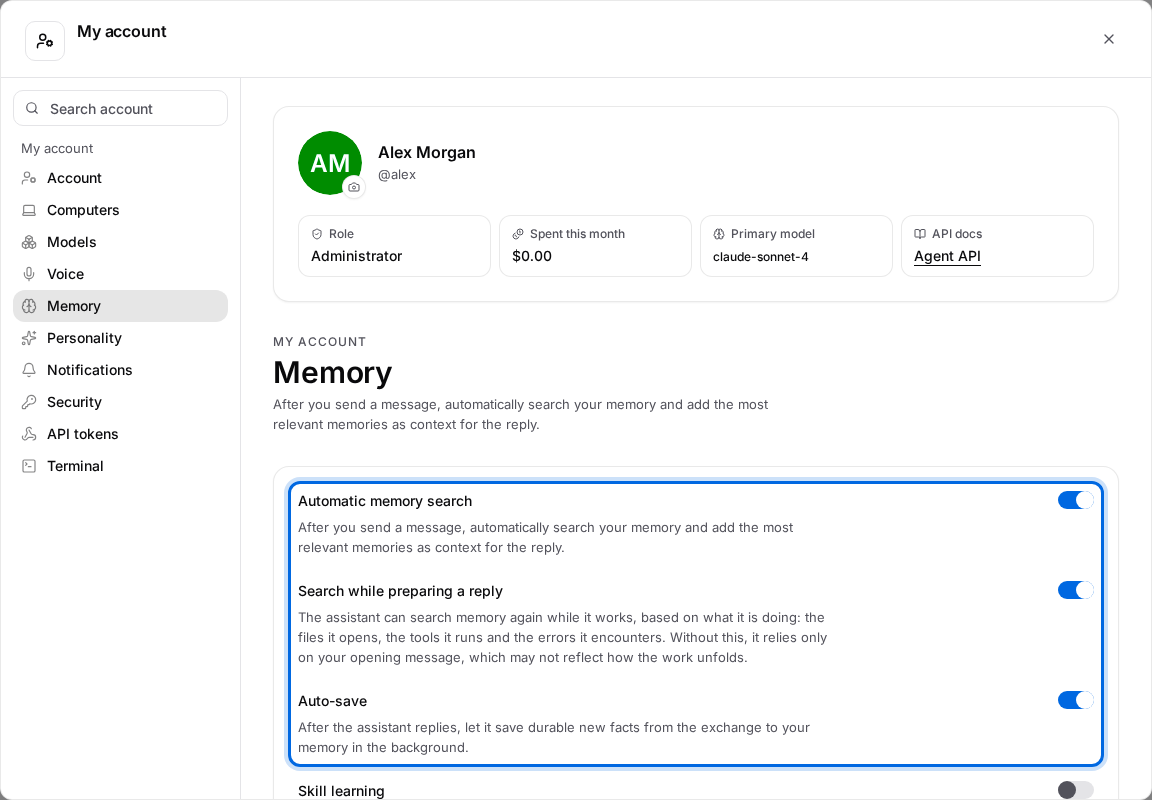
A change applies to the next message you send; you do not have to restart anything.
What recall adds to a reply
| How searching is set up | How Chetty matches your notes |
|---|---|
| A search model is set up by the administrator | By meaning, so a note worded differently still counts |
| No search model | By keywords, with newer notes preferred |
Chetty brings in up to ten notes, and it skips the notes already visible in the conversation, so the same one is not repeated.
When a search arrives late
Chetty waits up to five seconds for the notes. If the search takes longer, the answer starts without them and they join the next step, or the next message.
Nothing is searched twice, so a slower search costs you no extra work.
What auto-save does
With Auto-save on, a background pass reads the finished exchange and can add, correct, merge or delete notes. At most two notes change per exchange, and the pass needs the Utility model; while the administrator has not set one, nothing is saved by itself.
Asking Chetty to remember or forget works either way, so you can always say it in the conversation: Tell Chetty what to remember or forget.
If a search returns nothing
- A note you expected is missing. It may have no category, sit in a category of another Project, or be too faded to count. Look for it in Manage memories in the Memory page.
- The answers feel random. Without a search model Chetty falls back to keywords and recent notes. Ask your administrator to set one up.
- Nothing was saved after a reply. Auto-save is off, the Utility model is not set, or this exchange used up its share of changes.